Controls
All controls are window procedures registered with commctl.h. Create them as child windows of a parent; notifications are sent to the root window via evCommand.
Controls In Applications
The framework controls are intended to compose into dense, practical tools. These application captures show their normal states and proportions.
| Application | Controls shown |
|---|---|
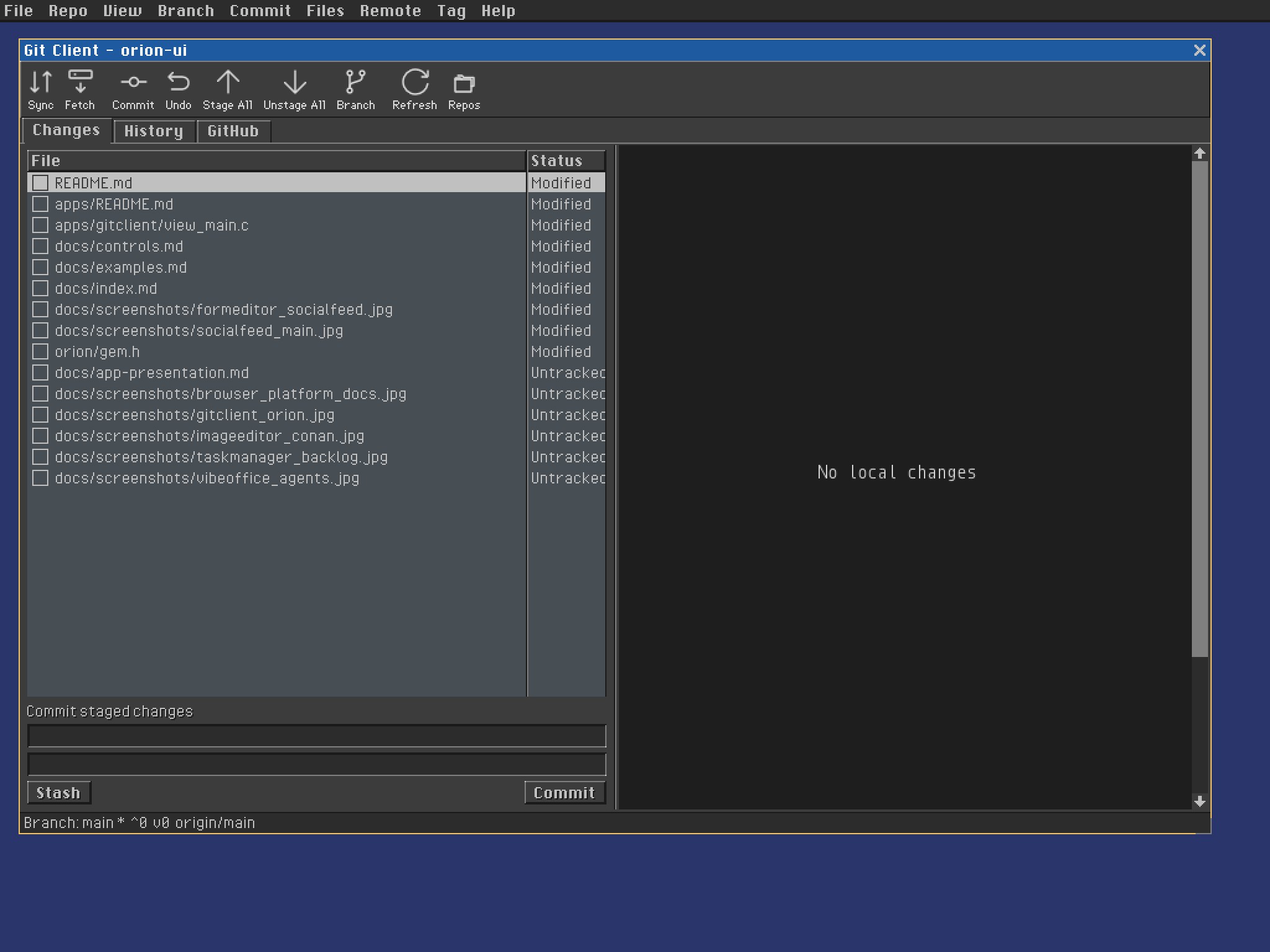 | Menu bar, icon toolbar, tab view, report view, checkbox cells, text edits, buttons, split view, scrollbars, and status bar |
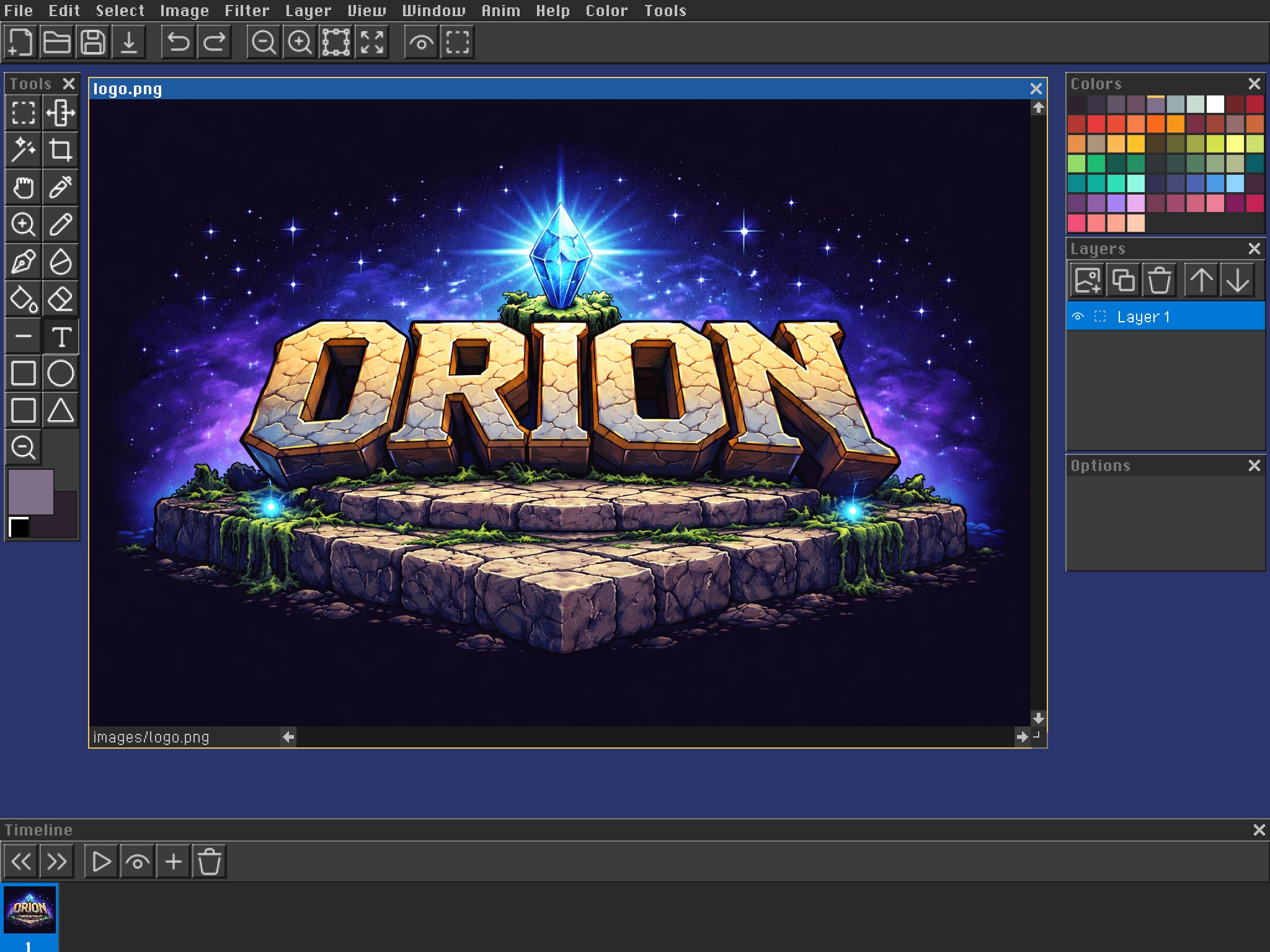 | Menu bar, icon toolbar, MDI document, tool palette, swatches, layer list, option panel, timeline, and scrollbars |
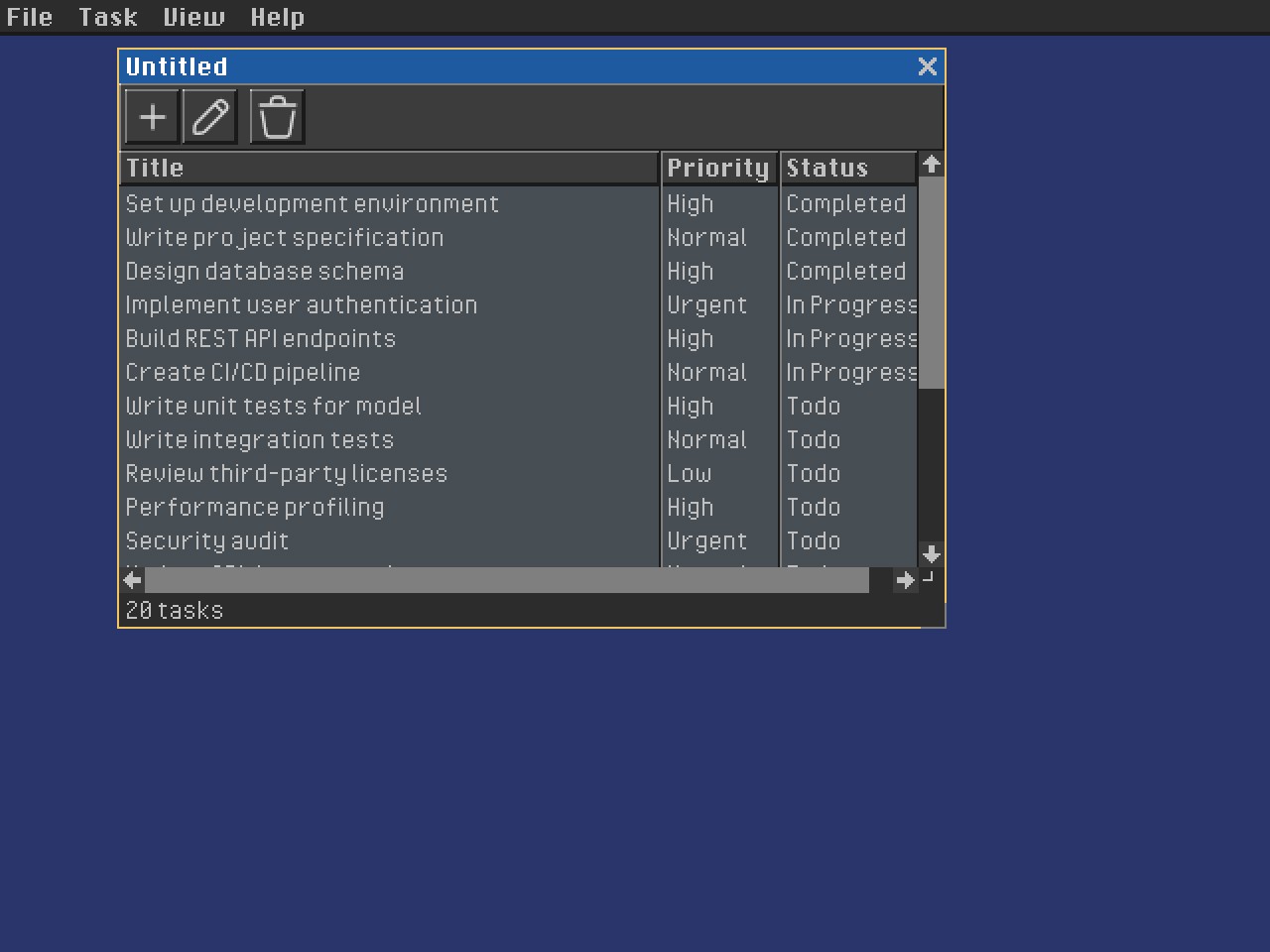 | Menu bar, toolbar, table view, status bar, sortable columns, and document window |
For focused API details and message contracts, use the sections below. For guidance on capturing and presenting a complete application, see the Application Presentation Guide.
Scrollbar
See Scrollbars for the complete scrollbar documentation covering both built-in window scrollbars (WINDOW_HSCROLL / WINDOW_VSCROLL + set_scroll_info()) and the standalone win_scrollbar control.
// Standalone scrollbar – orientation set via lparam: 0=horizontal, 1=vertical
window_t *vsb = create_window("", WINDOW_NOTITLE | WINDOW_NOFILL,
    MAKERECT(w - 8, 0, 8, h - 8),
    parent, win_scrollbar, 0, (void *)1 /* SB_VERT */);

scrollbar_info_t info = { .min_val = 0, .max_val = 200, .page = 50, .pos = 0 };
send_message(vsb, sbSetInfo, 0, &info);

// Receive position-change notification in the parent proc:
case evCommand:
    if (HIWORD(wparam) == sbChanged) {
        int new_pos = (int)(intptr_t)lparam;
    }
Important: Do not set WINDOW_HSCROLL or WINDOW_VSCROLL on a win_scrollbar window. Pass (void *)0 (horizontal) or (void *)1 (vertical) as lparam to create_window. The flags WINDOW_HSCROLL / WINDOW_VSCROLL are reserved for parent windows that want the framework’s built-in scrollbars.
Button
window_t *btn = create_window("Click Me", 0,
    MAKERECT(10, 10, 80, BUTTON_HEIGHT),
    parent, win_button, 0, NULL);

// Receive click in parent's proc:
case evCommand:
    if (HIWORD(wparam) == btnClicked)
        handle_click((window_t *)lparam);
Checkbox
window_t *chk = create_window("Enable fog", 0,
    MAKERECT(10, 30, 120, BUTTON_HEIGHT),
    parent, win_checkbox, 0, NULL);

// Query / set checked state
send_message(chk, btnSetCheck, btnStateChecked, NULL);
int state = send_message(chk, btnGetCheck, 0, NULL);
// state == btnStateChecked or btnStateUnchecked
Text Edit
window_t *ed = create_window("", WINDOW_NOTITLE,
    MAKERECT(10, 50, 200, CONTROL_HEIGHT),
    parent, win_textedit, 0, NULL);

// Read current text
const char *text = ed->title;

// Notification when text changes
case evCommand:
    if (HIWORD(wparam) == edUpdate)
        on_text_changed(((window_t *)lparam)->title);
Form validation (button gating pattern)
When a dialog button should be disabled until the user fills a field with valid input, gate the button on every edUpdate:
// 1. Helper: check business rules (e.g. name must be non-empty and available)
static bool branch_name_available(const char *name) {
  if (!name || !name[0]) return false;
  git_branch_t branches[256];
  int n = git_get_branches(repo, branches, ARRAY_LEN(branches));
  for (int i = 0; i < n; i++)
    if (strcmp(branches[i].name, name) == 0) return false;
  return true;
}

// 2. Helper: set button state from current field value
static void update_ok_button(window_t *win, const char *name) {
  window_t *ok = get_window_item(win, ID_DIALOG_OK);
  if (!ok) return;
  enable_window(ok, name && name[0] && branch_name_available(name));
}

// 3. In the window proc:
case evCreate:
  dialog_push(win, st, bindings, ARRAY_LEN(bindings));
  update_ok_button(win, st->name);  // initial state
  return true;

case evCommand:
  if (HIWORD(wparam) == edUpdate && LOWORD(wparam) == ID_DIALOG_NAME) {
    dialog_pull(win, st, bindings, ARRAY_LEN(bindings));
    update_ok_button(win, st->name);  // re-validate every keystroke
    return true;
  }
Key points:
dialog_pushonevCreatepopulates controls;dialog_pullonedUpdatereads back.enable_window(control, bool)enables/disables any window, not just buttons.- Validation must be cheap (in-memory lookup) because it runs on every keystroke.
- The OK button’s own
btnClickedhandler should still validate — the button might be enabled via keyboard accelerator or keyboard-only interaction.
Label
create_window("Name:", WINDOW_NOTITLE,
    MAKERECT(10, 10, 60, CONTROL_HEIGHT),
    parent, win_label, 0, NULL);
Combobox
window_t *cb = create_window("", 0,
    MAKERECT(10, 70, 150, BUTTON_HEIGHT),
    parent, win_combobox, 0, NULL);

send_message(cb, cbAddString, 0, (void *)"Option A");
send_message(cb, cbAddString, 0, (void *)"Option B");

int sel = send_message(cb, cbGetCurrentSelection, 0, NULL);

// Selection-change notification:
case evCommand:
    if (HIWORD(wparam) == cbSelectionChange) { … }
ColumnView
A family of item-list controls with shared RVM_* messages and RVN_* notifications:
win_iconviewfor the small-icon listwin_reportviewfor the multi-column report viewwin_icongridfor the thumbnail grid
Used by the file manager, file-picker dialog, and several editor palettes.
#include "commctl/columnview.h"

window_t *cv = create_window("", WINDOW_NOTITLE | WINDOW_VSCROLL,
    MAKERECT(0, 0, 300, 200),
    parent, win_reportview, 0, NULL);

// Add items
reportview_item_t item = {
    .text  = "Documents",
    .icon  = icon8_editor_helmet,
    .color = COLOR_TEXT_NORMAL,
};
send_message(cv, RVM_ADDITEM, 0, &item);

// Clear all items
send_message(cv, RVM_CLEAR, 0, NULL);

// Selection notification in root proc:
case evCommand:
    if (HIWORD(wparam) == RVN_SELCHANGE || HIWORD(wparam) == RVN_DBLCLK) {
        reportview_item_t *it = (reportview_item_t *)lparam;
        printf("Selected: %s\n", it->text);
    }
ColumnView Messages
| Message | wparam | lparam | Returns |
|---|---|---|---|
RVM_ADDITEM | – | reportview_item_t * | index |
RVM_DELETEITEM | index | – | bool |
RVM_CLEAR | – | – | bool |
RVM_GETITEMCOUNT | – | – | count |
RVM_GETSELECTION | – | – | index |
RVM_SETSELECTION | index | – | bool |
RVM_SETCOLUMNWIDTH | px | – | bool |
RVM_GETITEMDATA | index | reportview_item_t * | bool |
RVM_SETITEMDATA | index | reportview_item_t * | bool |
Menu Bar
#include "commctl/menubar.h"

static const menu_item_t kFileItems[] = {
    {"New",    ID_NEW},
    {"Open…",  ID_OPEN},
    {NULL,     0},          // separator
    {"Quit",   ID_QUIT},
};
static const menu_def_t kMenus[] = {
    {"File", kFileItems, 4},
};

// Create menu bar (ALWAYSONTOP, full screen width)
window_t *mb = create_window("",
    WINDOW_NOTITLE | WINDOW_ALWAYSONTOP | WINDOW_NORESIZE | WINDOW_NOTRAYBUTTON,
    MAKERECT(0, 0, screen_w, MENUBAR_HEIGHT),
    NULL, my_menubar_proc, 0, NULL);
send_message(mb, kMenuBarMessageSetMenus, 1, (void *)kMenus);
show_window(mb, true);

// In my_menubar_proc – chain to win_menubar then handle selection:
static result_t my_menubar_proc(window_t *win, uint32_t msg,
                                 uint32_t wparam, void *lparam) {
    if (msg == evCommand &&
        HIWORD(wparam) == kMenuBarNotificationItemClick) {
        switch (LOWORD(wparam)) {
            case ID_NEW:  new_file();    break;
            case ID_OPEN: open_file();   break;
            case ID_QUIT: ui_request_quit(); break;
        }
        return true;
    }
    return win_menubar(win, msg, wparam, lparam);
}
Declarative context menus
Define reusable context menus in .orion and attach them to controls. A command reference reuses the same generated ID as a menubar or toolbar command, so every invocation flows through the normal evCommand dispatcher. An item with a name instead creates a command in the context menu’s scope.
<contextMenus>
    <contextMenu name="files">
        <item name="stage" label="Stage" />
        <item name="unstage" label="Unstage" />
        <separator />
        <item command="commit.discard" label="Discard" />
    </contextMenu>
</contextMenus>

<TableView name="files" source="db.files" context-menu="files">
    <Column field="path" title="File" width="0" />
</TableView>
The generated form stores the immutable menu descriptor on the control. The control opens it at the pointer position; application code handles command IDs and does not populate the menu programmatically.
The menu tree is the application capability map: every user-invokable operation should first be declared as a menu item. Context menus and toolbars use fully qualified references such as command="files.stage"; they are alternate surfaces for the same action, not independent action registries. Menu items can declare a default shortcut="Ctrl+S", which the generator exposes through the same command ID.
Data-bound TableView checkboxes
TableView supports WinAPI-style list-view state images with a DBKit-style boolean binding. Declare check-field on the view; the field need not also be a visible column:
<TableView name="files" source="db.files" check-field="staged">
    <Column field="status" title="St" width="24" />
    <Column field="path" title="File" width="0" />
</TableView>
The generated tableview_params_t binds each row’s unchecked/checked state to the staged field. Clicking the state image or pressing Space emits RVN_ITEMCHECK; LOWORD(wparam) is the row and lparam is the source view. Use tvGetRecord to retrieve the bound record, apply the domain action, then refresh the view. This keeps the database/model authoritative instead of silently mutating a cache inside the control.
The underlying ReportView follows the WinAPI state-image convention:
send_message(view, RVM_SETEXTENDEDSTYLE, RVS_EX_CHECKBOXES,
             (void *)(uintptr_t)RVS_EX_CHECKBOXES);
ReportView_SetCheckState(view, row, true);
bool checked = ReportView_GetCheckState(view, row);
State-image indices are one-based and stored under RVIS_STATEIMAGEMASK, matching LVS_EX_CHECKBOXES/LVIS_STATEIMAGEMASK semantics.
For forms with multiple views of a related table, set master explicitly so the generator does not infer the wrong master from another page. Use a control name to bind it, or none for an unfiltered working-set view:
<TableView name="changes" source="db.files" master="none" />
<TableView name="commit_files" source="db.files" master="commits" />
TabView
TabView is a Win32-style tab container. Its direct children are pages, each child’s text is its tab caption, and only the selected page is visible:
<TabView name="views" flags="flexspace">
    <StackView name="changes" text="Changes">...</StackView>
    <StackView name="history" text="History">...</StackView>
</TabView>
Use tcGetSelection and tcSetSelection to query or change the zero-based page index. User selection sends evCommand with tcnSelChange and the TabView in lparam.
Console
// Global console overlay (toggle with F1 or backtick)
init_console();
conprintf("Hello from console\n");
draw_console();        // call each frame to draw when visible
toggle_console();
shutdown_console();
Terminal (VGA Console)
A VGA-accelerated terminal with scrollback, ANSI escape parsing, and optional Lua scripting. Built-in commands: echo, help, clear, dir/ls, pwd, cd, cat, date, whoami, lua <script.lua>.
Run as standalone: terminal [script.lua]
Vertical toolbars
Use WINDOW_TOOLBAR with tbSetOrientation, TOOLBAR_VERTICAL for tool selectors. See Toolbars for layout and custom item drawing.